Simple Modern and Intuitive Language for Everyone
Write a small, readable program. See how it becomes C#, Java, C++, and seven other languages. SMILE is a beginner-first educational language, a working transpiler, and a Windows desktop environment for exploring the connection between source code and the code a compiler generates.
Current release: 1.0.0 · Language: Core BASIC 2.1 — Text-Game Foundation · 10 active targets · Windows / .NET 10
Latest progress · Desktop · Small programs · Compiler · Quick start · Contribute
Latest progress
Text, routines, Double math, and persistence back-ported from SMILE 2.0
Text_Length, Text_Code_At, and Text_Slice now inspect Unicode scalars, including emoji. Routines support exact-type ByRef variables and array cells, typed Optional defaults, named arguments, and multiline parameter lists; Number expressions also accept unary +. The evaluator and all ten targets preserve argument evaluation order. Windows C#, Java, and Python output explicitly uses UTF-8 when the program contains Unicode text.
Double adds fractional and exponent values while Number stays a whole-number type. All ten targets support Double variables, arrays, routines, Optional defaults, exact comparisons, explicit Number/Text conversions, and the math functions below. Invalid domains, zero divisors, conversion overflow, and nonfinite results fail with the SMILE source line.
Dim Speed As Double
Speed = ToDouble(3) / 2.0
Print Speed
Print Sqrt(9.0); ":"; Round(2.5)
Print Text_From_Double(-0.0)
This prints 1.5, 3.0:2.0, and -0.0. Double math also includes Abs, Min, Max, Clamp, Sin, Cos, Atan2, Floor, Ceiling, and Truncate. Use ToNumber for checked truncation and Text_To_Double to parse invariant decimal text. No implicit Number/Double conversion occurs.
The text, console and core-language back-port is recorded in the back-port inventory. Modules, application projects and deterministic source-owned libraries are supported. Double output uses native binary64 arithmetic and standard math APIs, with small checks where the target permits infinities or has different conversion rules. COBOL needs C interoperability for exact binary64 operations because its ordinary decimal arithmetic and numeric transfers lose distinctions required by SMILE. Exponent spelling and transcendental rounding can differ between targets.
ByRef changes the caller's storage immediately, including when two parameters
refer to the same variable. Ordinary parameters remain independent ByVal copies.
Array indices are captured and checked once, in source order, before later
arguments run. Optional parameters must be ByVal.
Dim Score As Number
Call AddPoint(Score)
Print Score

Sub AddPoint(ByRef Value As Number)
    Value = Value + 1
End Sub
This prints 1. C#, C/C++, MASM, and COBOL use native references or pointers.
Java, JavaScript, and Python pass ordinary mutable arrays with a captured index;
only addressed scalar variables need a one-element array. Swift uses inout
where exclusive access is safe and a small location closure for shared aliases.
Load Text File Path Into Bytes Count ByteCount now reads bounded UTF-8 bytes
into a one-dimensional Number array on all ten targets. It removes an initial
UTF-8 BOM, clears unused cells, and returns zero for missing/unreadable files.
Paths are normalized relative to the executable (or script/class directory),
with escaping paths rejected. Place data files there when running generated
programs, or declare project assets to publish them automatically. Node.js reads
asynchronously. See the official file-read contract.
Console controls also recognize O/F/G/R/P/B/X/Y/Z/E/C, Backtick, Plus and Minus
with SMILE 2.0 key codes on every target. KEY_CONTROL reports standalone left/right Control presses through native console events.
Integer Load and Save persist Number values across runs on all ten targets:
Dim Best As Number
Load Best From "best-score" Default 0
Best = Max(Best, 100)
Save Best To "best-score"
Keys are nonempty Text literals. Load always evaluates its Number default first;
missing, invalid, or unreadable values use it. Save accepts a Number variable or
constant and ignores storage failures. Files contain plain decimal integers under
%LOCALAPPDATA%\SMILE\Games\<program>\<key>.txt. CLI/Desktop use the source
filename stem for a stable program identity across targets and temporary runs;
Save As with a new name selects a different storage directory. Names/keys replace
non-ASCII letters/digits (except _ and -) with underscores. This is a separate
SMILE 1.0 namespace; it does not import SMILE 2.0 saves automatically.
Save Data Bytes Count Length To Key Status State and
Load Data Key Into Bytes Count Length Status State now persist byte arrays on
all ten targets. Computed Text keys, SHA-256 checksums, 1 MiB blocks, backup
recovery and the DATA_STATUS_* constants follow SMILE 2.0. Checked loads keep
the array intact on failure; successful loads change only the returned bytes.
Omit Status for strict operations that stop on storage errors (a missing load
returns zero). See the Data contract,
including Node.js's two-step atomic backup/primary publication. Projects use an
explicit ApplicationId, falling back to OutputName; loose files also accept
--application-id. Libraries share their consuming application's identity.
Nominal enums now work in the evaluator and all ten targets:
Enum Direction
    None
    Left = -1
    Right = 1
End Enum
Dim Heading As Direction
Heading = Direction.Left
Print Heading = Direction.Left
Members hold checked signed 64-bit values; aliases are allowed and storage defaults to zero. Enum arrays, Const, exact-type ByVal/ByRef, Optional defaults, returns and Select Case are supported. Enum values cannot be printed, converted to Number, ordered or used in arithmetic. See the enum contract.
Type records group values and copy them independently, including nested records
and fixed array fields. They work in the evaluator and all ten targets:
Type ScoreEntry
    Player As Text
    Points As Number
End Type
Dim Current As ScoreEntry
Dim Saved As ScoreEntry
Current.Player = "Sin"
Current.Points = 10
Saved = Current
Current.Points = 20
Print Saved.Player; ":"; Saved.Points
Records support variables, array cells, ByVal/ByRef parameters and returns.
Writable fields can be passed ByRef, including fixed-array field cells, and can
receive Data Count/Status outputs. Copying a whole record preserves existing
references into its fields. Whole records cannot be printed, compared, used in
arithmetic or stored in Const. With CurrentEntry ... End With captures a writable
record location once; leading-dot expressions such as .Points use that record.
Nested blocks use the nearest receiver, and array indexes run once on entry.
Types also contain Sub/Function methods and Property Get/Set accessors. Me
borrows the current record; a setter receives its new value as Value. Methods
and properties are Public by default and may be Private; fields remain Public.
Member calls support Optional and named arguments. A property assignment evaluates
its new value before capturing its receiver.
Class declares reference objects. Dim Board As New ScoreBoard() or
Board = New ScoreBoard() constructs an instance; assignment, ByVal and returns
copy its reference. An optional Sub New(...) initializes fields. Class fields
are Private by default, while methods and properties are Public by default.
Nothing is the default reference; Is and Is Not compare identity. With Board
captures the reference once, even if Board is reassigned inside the block. A
Nothing receiver fails before method arguments or field indexes run. Class fields
may contain scalar values, enums, records and fixed arrays, but not other class
references; arrays of class references are also unsupported, matching SMILE 2.0.
Module ... End Module, Import Name As Alias, source-local imports/Option
Explicit, Public/Private module declarations and qualified names work across
multiple sources and all ten targets. Application .smileproj files select a
startup source, references, runtime assets and persistent ApplicationId. Desktop
opens the project and edits its startup source. The CLI also builds and consumes
deterministic .smilelib format-7 packages with exact dependencies and source/API
validation. Try Scoreboard or follow the
Modules and Projects guide.
dotnet run --project src/SMILE.Cli -- --project examples/modules/Scoreboard.smileproj --target python --run
dotnet run --project src/SMILE.Cli -- --project examples/modules/library/Counters.smilelibproj --target library -o out/Counters.smilelib
Three original games, written entirely in SMILE
The latest implementation expands the terminal games with larger boards, named colors, cursor-based redraws, and state-driven updates. Their rules live in ordinary .smile programs: arrays hold the board, routines organize behavior, and loops respond to keys and time.

Lantern Maze — explore a symmetric 71-by-21 collection maze, travel through side tunnels, and avoid four shadows with different targeting behavior.


The three board diagrams above render actual evaluator output with scripted input, including cursor-positioned characters. They are illustrations of captured game states, not terminal screenshots; presentation colors are illustrative. Visual provenance.
These are terminal games. Run their generated programs in an attached Windows console of at least 80 columns × 25 rows. The games prepare rows before overwriting the previous frame, redraw when state changes, and clear at screen transitions. Keyboard controls do not require Enter after each move.
Recent foundations beneath the games
| Implemented progress | What it enables |
|---|---|
| Larger, colored terminal games | Three complete examples with real-time controls, scores, and reusable routines. |
| Explicit source formatting | Format SMILE or Ctrl+K, Ctrl+D formats valid source in one undoable edit. |
| Find and Go to Line | Ctrl+F and Ctrl+G navigate the focused source or generated-code editor. |
| Core BASIC 2.1 terminal primitives | Fixed 2D arrays, key polling, cursor movement, colors, timing, and random values. |
| Readable target output | Native control flow and routines, semantic spacing, and support emitted only when needed. |
See the same program in three languages
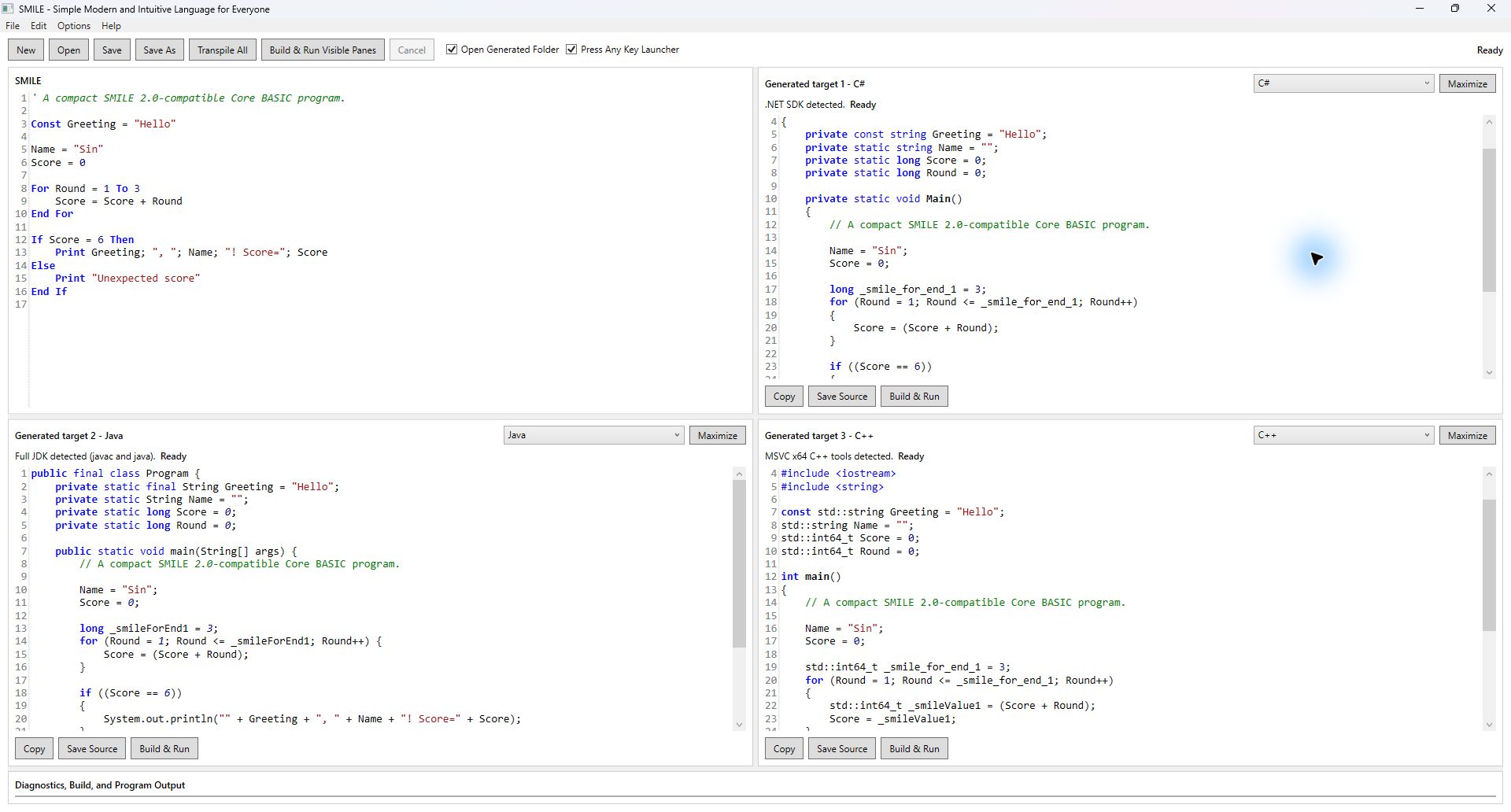
Current Desktop build, captured for this README. The source is examples/core-basic.smile; the three destination panes favor C#, Java, and C++.
The Desktop makes the compiler visible: edit SMILE on the left, inspect the generated source, then build and run with an installed target toolchain. All ten targets remain selectable. Toolchain discovery, generation, compilation, and process work run asynchronously so the editor stays responsive.
Desktop loads the cumulative language.smile reference after its first paint. Live transpilation updates the visible target without rewriting learner source. Recoverable failures appear in the output area and keep the IDE open.
Small programs you can read and run
Save any of these snippets as a .smile file and open it in Desktop, or use the CLI in the quick start. Each example is complete.
1. Greet someone
Variables can begin with a direct assignment. Print joins its semicolon-separated expressions on one line.
Name = "Sin"
Print "Hello, "; Name; "!"
Hello, Sin!
2. Add a sequence and make a decision
For includes both endpoints. If keeps the condition readable.
Total = 0

For StepNumber = 1 To 3
    Total = Total + StepNumber
End For

If Total = 6 Then
    Print "Total="; Total
End If
Total=6
3. Store scores and call a function
Use explicit types when teaching declarations. Array indexes start at zero; routines accept typed values.
Option Explicit

Dim Scores[3] As Number

Dim Index As Number
Dim Total As Number

Scores[0] = 1
Scores[1] = 2
Scores[2] = 3

For Index = 0 To 2
    Total = Total + Scores[Index]
End For

Print "Double="; Double(Total)

End Program

Function Double(Value As Number) As Number

    Return Value * 2

End Function
Expected output:
Double=12
4. Start a game board
A two-dimensional array stores a grid. Abs provides a simple building block for distance calculations.
Dim Board[4, 3] As Text

Board[1, 1] = "@"

PlayerX = 1
EnemyX = 6

Print "Player="; Board[1, 1]
Print "Distance="; Abs(PlayerX - EnemyX)
Player=@
Distance=5
For complete interactive programs, follow the three game sources above or the smaller Text-Game Foundation example.
How the compiler works
The engine carries immutable type symbols through binding, evaluation and
generation. Built-in types are shared symbols; storage categories are separate
from exact type identity. Each Enum and Type declaration owns a distinct type
symbol, as does each Class declaration.
For Engine API callers, SmileType is now a symbol class with Kind and Name;
the existing SmileType.Integer, Double, String, Boolean, and Error
members remain available. Parsed declarations carry TypeNameSyntax; the binder
resolves those names to symbols. Existing scalar source remains valid.

- Parse the structure. The lexer and parser recognize the canonical language and preserve source locations for diagnostics.
- Check the meaning. The binder resolves names, scopes, types, routines, arrays, and control flow into one bound program.
- Evaluate or generate. The evaluator and every target writer consume that same checked meaning. Targets do not reparse the learner's program.
- Read, build, and run. Writers produce normal destination source. Optional toolchains compile or execute it in temporary workspaces.
Generated code is part of the lesson. A SMILE loop should remain a recognizable loop, a routine should become an ordinary routine, and a tiny program should produce proportionate output. Target-specific helpers are used only where needed to preserve meaning. See the architecture and generation standard for the actual boundaries and tradeoffs.
Canonical language
SMILE 1.0 accepts one canonical language: Core BASIC 2.1 — Text-Game Foundation. The shared Core BASIC subset aligns with SMILE 2.0; 2.1 is a language milestone, not a second product or a selectable dialect.
Core BASIC 2.1 provides:
- case-insensitive Unicode identifiers and apostrophe comments;
Number,Boolean, andTextscalar values with exact fixed types;- implicit variables by first direct assignment, explicit
Dim ... As ..., and immutableConstvalues; - typed expressions with normal precedence, short-circuit
And/Or, Text concatenation, truncating division, and signedMod; - expression-list
Print, including blank Print and trailing-semicolon newline suppression; If / Else If / Else / End If;- ascending
For ... Toand descendingFor ... Down To, closed byEnd For; - post-tested
Do / Loop Until, unconditionalDo / Loop,Exit For, andExit Do; - optional
Option Explicit; - top-level
SubandFunctionroutines,Call,Return, exact typed ByVal/ByRef parameters, routine-local scope, and recursion; - Optional literal/Const defaults, named arguments using
Name:=Value, and multiline routine declarations; - Unicode scalar
Text_Length,Text_Code_At, andText_Slice, plus unary Number+; Select Caseover exact scalar constants;- checked fixed one- and two-dimensional arrays with zero-based indexes;
- nonblocking
Get Key, stableKEY_*constants,Clear Screen, 1-basedMove Cursor To, namedText Color, and millisecondWait; - inclusive
Random ... From ... To ..., monotonicTimer(), andAbs/Min/Max; End Program.
The complete current language is defined by the SMILE Core BASIC 2.1 Text-Game Foundation Official Specification. The Core BASIC 2.0 specification and Profile 2.0 record preserve the unchanged shared subset and parity corpus. See the migration guide, parity report, and self-contained student language reference.
This release intentionally rejects earlier SMILE 1.0-only syntax. The compiler does not silently reinterpret old source. Core BASIC 1 remains a valid subset, while its former active documentation is preserved under Requirements/Archive/Core-BASIC-1.
Current boundaries: no blocking Input, graphical game window, sound, arbitrary file I/O, or dynamic arrays. Bounded text-file reads, project assets, modules/libraries and Number/Data persistence are supported. Library package builds use the CLI; Desktop edits an application project's startup source. Number is a signed 64-bit whole-number type. This is an active research project; deliberate language improvements update living examples and documentation together, without a legacy parser or external backward-compatibility promise.
Ten active targets
The same parsed and bound program generates all ten active destinations:
| CLI ID | Destination | Primary file |
|---|---|---|
csharp |
C# | Program.cs plus a minimal project file |
c |
C | Program.c |
masm-x64 |
Windows x64 MASM Assembly | Program.asm |
javascript |
JavaScript (Node.js) | Program.js |
java |
Java | Program.java |
cobol |
COBOL | Program.cob |
objective-c |
Objective-C | Program.m |
swift |
Swift | Program.swift |
python |
Python | Program.py |
cpp |
C++ | Program.cpp |
Generated code uses native destination constructs whenever practical: ordinary routines and call frames, locals/globals, arrays, conditionals, counted and post-test loops, combined destination-native output, native selection where its type rules are exact, and direct process termination. A shared semantic layout keeps imports, state, entry code, learner routines, and unavoidable support in readable sections.
Target-native implementation details
Helpers appear only when a target needs one to preserve semantics, such as checked indexes, C Text concatenation, or Python's typed exit across differently nested loop kinds. C, Objective-C, and MASM Text concatenation uses explicit generated roots and bounded statement-boundary collection; a feature-gated MASM C companion supplies only that lifetime mechanism. COBOL pairs its native fixed PIC X(4096) Text storage with an explicit logical length so DISPLAY preserves meaningful spaces in variables, arrays, routine calls, returns, comparisons, concatenation, and game cells. Python output is a direct module-level script—no synthetic main() wrapper. JavaScript is executed by Node.js with no npm dependency. Only Get Key adds a small generated Windows console addon, built locally with the installed Visual Studio C++ tools.
For interactive programs, generated code polls real terminal keys without requiring Enter, clears or positions the attached console, applies named foreground/background colors, waits without a busy loop, and restores changed input state. Games explicitly reset their colors before returning. Node.js uses async main only for Wait or asynchronous file/persistence operations; its delay remains Promise-based and key polling does not change stdin mode. Noninteractive programs receive none of that support.
See Architecture, Toolchains, and the Target Code Generation Standard.
Examples
examples/language.smile— cumulative valid language reference packaged with Desktop;examples/core-basic.smile— compact end-to-end example;examples/control-flow.smile— counted loops, post-test loops, and typed exits;examples/core-basic-2-canonical.smile— cumulative routines, Select, and arrays;examples/core-basic-2-byval-scope.smile— ByVal isolation and shadowing;examples/core-basic-2-recursion.smile— direct and mutual recursion;examples/core-basic-2-arrays.smile— checked fixed arrays and their default values;examples/core-basic-2-select.smile— exact typed Select cases;examples/core-basic-2-parameters.smile— 0 through 16 parameters;examples/core-basic-2-evaluation-order.smile— left-to-right calls and short circuiting;examples/core-basic-2-local-arrays.smile— fresh local arrays in ordinary and recursive calls;examples/core-basic-2-end-program-routine.smile— whole-program termination from a routine;examples/text-game-foundation.smile— compact 2D array and terminal-primitive demonstration;examples/text-snake.smile— Trail Runner, a complete growing-trail game on a roomy 60-by-17 board;examples/text-maze-muncher.smile— Lantern Maze, an original 71-by-21 symmetric collection maze with a ghost house, wrap tunnel, and four distinct targeting shadows;examples/text-falling-blocks.smile— Sky Foundry, an original seven-family falling-block game with a widened, colored playfield;tests/CoreBasic2Parity/canonical.smile— unchanged Profile 2 fixture compiled by both repositories.
All examples use only the canonical Core BASIC 2.1 language. The three games are terminal programs, not graphical games; use an attached Windows console of at least 80 columns by 25 rows for real-time controls and colored full-frame overwrite. They prepare complete rows before moving the cursor to the top-left, redraw only when state changes, and clear only at screen transitions, so there is no visible blank frame or instruction text beneath the playfield.
Quick start
Requirements
- Windows with the .NET 10 SDK for the solution, CLI, tests, and Desktop application;
- an optional destination toolchain to build/run generated output locally.
Target detection is independent. Missing optional compilers do not prevent transpilation or use of installed targets.
Build and open Desktop
Restore and build:
dotnet restore SMILE.sln
dotnet build SMILE.sln -c Debug --no-restore -nologo
dotnet run --project src/SMILE.Desktop --no-build
Open examples/core-basic.smile, select C#, Java, or C++ in a destination pane, and inspect the generated source. Build & Run becomes available when that destination's toolchain is installed; C# uses the .NET SDK already required above.
For a game, open its .smile file, leave Open Generated Folder and Press Any Key Launcher enabled, and use Build & Run for the chosen target. The redirected run cannot receive game keys; cancel that run once compilation finishes, or let its timeout return control. In the generated folder, launch the generated program or its press-any-key launcher in an attached console for keyboard play.
Use the CLI
dotnet run --project src/SMILE.Cli -- examples/core-basic.smile --target csharp --run
dotnet run --project src/SMILE.Cli -- examples/core-basic.smile --target java
dotnet run --project src/SMILE.Cli -- examples/core-basic.smile --target cpp
dotnet run --project src/SMILE.Cli -- examples/core-basic.smile --target all
Format source explicitly
dotnet run --project src/SMILE.Cli -- examples/language.smile --format
dotnet run --project src/SMILE.Cli -- examples/language.smile --check
pwsh -File scripts/Format-Smile.ps1 -Check
The formatter parses and binds first, preserves exact Text and apostrophe-comment content, normalizes logical paragraphs and four-space indentation, is idempotent, and leaves invalid source untouched. Desktop offers the same operation through Edit → Format SMILE or Ctrl+K, Ctrl+D.
Validation
The repository includes language conformance, deterministic generation, Desktop, formatting, scripted game, real console, and toolchain tests. See the validation architecture for their responsibilities. Test commands below describe available checks; they are not a claim that every matrix ran for this documentation update.
Run the focused mission guardrail:
dotnet test tests/SMILE.Tests/SMILE.Tests.csproj -c Debug --filter TestCategory=MissionGuardrail -nologo
Run canonical conformance and generation tests:
dotnet test tests/SMILE.Tests/SMILE.Tests.csproj -c Debug --filter "FullyQualifiedName~CoreBasicConformanceTests|FullyQualifiedName~CoreBasic2ConformanceTests|FullyQualifiedName~CoreBasicGenerationTests" -nologo
Broader milestone and parity checks
At a language milestone or release, run the profile and Text-Game Foundation matrices with their required toolchains installed:
dotnet test tests/SMILE.Tests/SMILE.Tests.csproj -c Debug --filter TestCategory=MilestoneMatrix -nologo
pwsh -File scripts/Test-TextGameFoundation.ps1
Run the pinned cross-repository parity check:
pwsh -File scripts/Test-CoreBasicParity.ps1
The parity command runs the retained Profile 1 gate and the new Profile 2 fixture/hash gate. It reads SMILE 2.0, verifies its pinned commit and exact working-tree status before and after, and writes all executable output beneath the system temporary directory. It never modifies SMILE 2.0 or pre-existing authority work.
The engineering and the opportunity
Created by Sin / Louiery Sincioco, SMILE brings language design, compiler construction, native code generation, and desktop tooling together in a public, inspectable project. Its central question is practical: how can a beginner learn one clear idea and recognize it in several professional programming languages?
| Engineering work you can inspect | Where to look |
|---|---|
| One front end with typed binding and shared semantics | Engine and architecture |
| Ten destinations with explicit native-language tradeoffs | Generators and generation standard |
| Responsive WPF tools and cancellation-aware build/run integration | Desktop and toolchains |
| Deterministic game evaluation, real-console tests, and parity fixtures | Tests and parity report |
For contributors: useful work includes clearer beginner diagnostics, teaching examples, editor usability, and focused improvements to the ten existing targets. Read AGENTS.md and the Core Principles first; open an issue to discuss a concrete improvement, or submit a focused pull request with relevant validation.
For employers, collaborators, and supporters: the source, examples, and design decisions provide a working portfolio of compiler and developer-tool engineering. Explore Sin's GitHub profile to connect about related projects, collaboration, or opportunities to support educational programming tools.
Project policy
The active destination set is frozen at ten until Sin explicitly changes it. Routine validation follows Velocity Mode: use the smallest directly relevant checks, while broad all-target and cross-repository verification is appropriate for major milestones. Manual SMILE CI remains available through workflow_dispatch.
Historical requirement files are retained for research context, not as current language authority. Current behavior is governed by AGENTS.md, Core Principles, and the single current official specification.
The current hardening milestone is recorded in the Human-Readable Formatting and Hardening Completion Report.
License
SMILE is licensed under the GNU Affero General Public License v3.0. See LICENSE.